Adapt (Preview)
The Adapt API is in preview. Use it to build and test your integration, but don't release it to users in production until it is generally available. Request and response shapes may still change before then. Talk to your Epidemic Sound partner manager when you plan your launch.
The Adapt API lets your users reshape an Epidemic Sound track to fit their content. They can change its mood, style and instrumentation, rebalance its stems, or remove the vocals. A user who has found a track they like no longer has to settle for it as it is, or search for another one: they make it sound the way their content needs. You can offer this in your product as one-tap styles, a full stem mixer, or anything in between.
Adapt works on real catalog music rather than generating music from scratch, and every result stays cleared for use under the same license as the original track.
This guide explains how Adapt works and how to build it into your product. For every field, limit and response of the endpoints, see Adaptations in the API reference. To give an AI coding assistant the same details, use the OpenAPI specification.
When to use this
Adapt fits products where users have found a track they like and want it to fit their content better. Common uses:
- One-tap styles — buttons such as "Warmer" or "Dreamy" for users who aren't experienced with music.
- A stem mixer — for users who want full control over which parts of the track to change.
- An instrumental or rebalanced mix — mute or adjust individual stems without changing the style.
Adapt doesn't change a track's length. To fit a track to a duration, use Create versions.
See Building the experience for how these map to your UI.
Prerequisites
- API Key authentication — The Adapt API requires API Key authentication.
- Credits — Each adaptation costs 1,000 credits from your app's balance, for a remix or a compose.
Key concepts
Stems
A track is split into up to five stems: BASS, DRUMS, INSTRUMENTS, MELODY and VOCALS. Adapt works on stems one by one, so changing the melody leaves the bass and drums untouched. Not every track has stems; see Which tracks can be adapted.
Remix
A remix uses generative AI to restyle one or more stems. You send a prompt, such as "upbeat electronic dance remix with heavy bass", and optionally which stems to change. The Epidemic Sound API generates new audio for those stems; the rest stay as they are on the original track. The result is a complete track.
A remix always starts from the original track. Vocals can't be restyled, to respect the artist's original work. Use a compose to mute them or adjust their volume.
Use a remix when the user wants the track to sound different.
Compose
A compose uses no AI and generates no new audio. It is a stem mixer: you pick which stems to include, choose where each stem comes from, and set each stem's volume. The stems you list are the whole mix; a stem you don't list is left out.
Each stem can come from the original track or from an earlier adaptation of the same track. Use sourceAdaptationId to take a stem from an earlier adaptation, or leave it out to use the original.
Use a compose when the user wants to combine stems from different adaptations, change the balance between stems, or remove one, such as the vocals.
Building on earlier adaptations
Every job makes one adaptation: a new rendering of the track, with its own mix and stems. Adaptations build on each other, so a typical workflow is an "adapt, listen, refine" loop:
- First remix. The prompt "cinematic strings" with the stems
INSTRUMENTSandMELODY. The result is adaptation A: new instruments and melody, with the original bass and drums. - Second remix. The prompt "heavy electronic bass" with the stem
BASS. The result is adaptation B: a new bass, with the original instruments, melody and drums. - Compose. The melody from A, the bass from B and the original drums at half volume, without the vocals. The result is the final mix.
How it works
Adapting a track is asynchronous. The API models this as a job: you create it in one call and poll until it finishes. A job usually finishes within a minute.
- Create the job. Send the track ID and either a
remixor acompose. The API answers202with the job inIN_PROGRESS. - Poll until done. GET the job, no more often than once a second. When the status is
COMPLETED, the response carries a low-quality preview of the mix and of each stem. - Download. Request download links for the full mix and each stem, as a 320 kbps MP3 or a WAV.
A job's id is also the ID of the adaptation it makes. Use it to download the audio, and to take stems from it in a later compose. Treat IDs as opaque strings of up to 100 characters: store them and send them back exactly as the API returns them.
Which tracks can be adapted
You can adapt a full-length track from the Epidemic Sound catalog when it has stems and its artist allows generative AI. Pass the track's id from the v0 track endpoints, for example GET /v0/tracks/search or GET /v0/tracks/metadata, as sourceMusicTrackId. Uploaded audio and versions made with Create versions can't be adapted.
Every track those endpoints return lists its stems in availableStems (see Download stems). Offer Adapt only on tracks where the list isn't empty. Whether the artist allows generative AI isn't in the track metadata: you find out when you create the job, which then answers 400 with type /problems/adaptations/music-track-not-adaptable, without spending credits.
availableStems lists the track's stems in lowercase. The Adapt API uses the same names in uppercase:
availableStems (v0) | Stem type (Adapt) |
|---|---|
bass | BASS |
drums | DRUMS |
instruments | INSTRUMENTS |
melody | MELODY |
vocals | VOCALS |
Create a job
POST /v1/adaptations/jobs — see Create an adaptation job in the API reference.
Send either remix or compose, not both. See Key concepts for how they differ. Fields the API doesn't recognise are ignored, so a misspelled field name is dropped and the request still succeeds.
Remix request
curl -X POST 'https://api.epidemicsound.com/v1/adaptations/jobs' \
  -H 'Authorization: Bearer your-api-key' \
  -H 'x-partner-user-id: user-abc-123' \
  -H 'Content-Type: application/json' \
  -d '{
    "sourceMusicTrackId": "4c20406f-6937-49f7-8dcb-39647af926a4",
    "name": "Heavy bass remix",
    "remix": {
      "prompt": "Upbeat electronic dance remix with heavy bass",
      "stems": [{ "type": "BASS" }, { "type": "DRUMS" }]
    }
  }'
remix.prompt describes what the new stems should sound like: genre, mood, instrumentation. 1–2000 characters.
remix.stems names the stems to restyle. The stems you leave out stay as they are on the track. Leave out stems altogether to let the Epidemic Sound API choose from the prompt. Each type may appear once. Vocals can't be restyled, so VOCALS is refused with 400; see Remix.
Compose request
curl -X POST 'https://api.epidemicsound.com/v1/adaptations/jobs' \
  -H 'Authorization: Bearer your-api-key' \
  -H 'x-partner-user-id: user-abc-123' \
  -H 'Content-Type: application/json' \
  -d '{
    "sourceMusicTrackId": "4c20406f-6937-49f7-8dcb-39647af926a4",
    "name": "Remixed bass, original melody",
    "compose": {
      "stems": [
        { "type": "BASS", "sourceAdaptationId": "es:adaptation:6df34eda-b3d9-43dd-9118-98ed935d159c" },
        { "type": "DRUMS", "sourceAdaptationId": "es:adaptation:6df34eda-b3d9-43dd-9118-98ed935d159c", "volume": 0.6 },
        { "type": "MELODY", "volume": 0.8 }
      ]
    }
  }'
compose.stems is the whole mix. A stem you leave out is left out of the mix, so a compose that lists only BASS produces a bass-only track. Each type may appear once.
sourceAdaptationId takes the stem from an earlier adaptation: the id of a completed job on the same track, created by your app. Leave it out to take the track's original stem.
volume sets how loud the stem is, from 0 (silent) to 1 (as loud as in the track or adaptation it comes from). Defaults to 1. To mute a stem, leave it out or set volume to 0.
Response — 202 Accepted
{
  "id": "es:adaptation:6df34eda-b3d9-43dd-9118-98ed935d159c",
  "status": "IN_PROGRESS",
  "sourceMusicTrackId": "es:music-track:4c20406f-6937-49f7-8dcb-39647af926a4",
  "name": "Heavy bass remix",
  "remix": {
    "prompt": "Upbeat electronic dance remix with heavy bass",
    "stems": [{ "type": "BASS" }, { "type": "DRUMS" }]
  },
  "createdAt": "2026-10-28T18:35:14Z",
  "updatedAt": "2026-10-28T18:35:14Z"
}
The job repeats the remix or compose you sent. Two details:
- If you let the Epidemic Sound API choose the stems of a remix, the job has no
remix.stems. Neither the job nor its result says which stems were changed. - A compose stem you sent without a
volumeis shown withvolume: 1.
The credits are taken by this call. See Credits.
Poll the job
GET /v1/adaptations/jobs/{jobId} — see Get an adaptation job in the API reference.
curl 'https://api.epidemicsound.com/v1/adaptations/jobs/{jobId}' \
  -H 'Authorization: Bearer your-api-key' \
  -H 'x-partner-user-id: user-abc-123'
Poll no more often than once a second. When the job reaches COMPLETED or FAILED, stop polling. A job ID that does not exist, or that belongs to a different app, is answered 404.
Jobs belong to your app, not to the end user in x-partner-user-id: any job your app created can be read with any user ID. There is also no endpoint that lists jobs. Store each job id with the user it belongs to, so the user can come back to an adaptation and you can take stems from it later.
Example — polling loop (Node.js)
async function waitForAdaptation(apiKey, userId, jobId) {
  const url = `https://api.epidemicsound.com/v1/adaptations/jobs/${jobId}`
  const headers = {
    Authorization: `Bearer ${apiKey}`,
    'x-partner-user-id': userId,
  }

  while (true) {
    const res = await fetch(url, { headers })
    if (!res.ok) throw new Error(`Poll failed: ${res.status}`)
    const job = await res.json()

    if (job.status === 'COMPLETED') return job.result
    if (job.status === 'FAILED')
      throw Object.assign(new Error(`Adaptation failed: ${job.error.code}`), {
        code: job.error.code,
        retriable: job.error.retriable,
      })

    await new Promise((r) => setTimeout(r, 1000))
  }
}
Job lifecycle
status is the only field a client should branch on.
| Status | Terminal | Description |
|---|---|---|
IN_PROGRESS | No | The adaptation is being made. |
COMPLETED | Yes | The adaptation is finished. result is present. |
FAILED | Yes | The job did not finish. error is present, and its credits are refunded to your app. |
These three values are exhaustive. A client that switches on status has covered every case.
The result
When status is COMPLETED, the job includes a result object.
{
  "id": "es:adaptation:6df34eda-b3d9-43dd-9118-98ed935d159c",
  "status": "COMPLETED",
  "result": {
    "previewUrl": "https://audiocdn.epidemicsound.com/...",
    "stems": [
      { "type": "BASS", "previewUrl": "https://audiocdn.epidemicsound.com/..." },
      { "type": "DRUMS", "previewUrl": "https://audiocdn.epidemicsound.com/..." },
      { "type": "INSTRUMENTS", "previewUrl": "https://audiocdn.epidemicsound.com/..." },
      { "type": "MELODY", "previewUrl": "https://audiocdn.epidemicsound.com/..." }
    ]
  },
  ...
}
| Field | Description |
|---|---|
previewUrl | A low-quality MP3 preview of the full mix, for listening before a download. |
stems | Every stem in the finished mix. For a remix, that includes the stems that were not restyled. For a compose, the stems you listed. |
stems[].type | The stem type. |
stems[].previewUrl | A low-quality MP3 preview of that stem on its own. |
Treat every previewUrl as opaque: use the whole value, including its query string, without parsing or changing it. The previews are for listening only. To get the audio for use in content, download it.
Download the audio
POST /v1/adaptations/{adaptationId}/downloads — see Create download links for an adaptation in the API reference.
adaptationId is the id of a completed job.
curl -X POST 'https://api.epidemicsound.com/v1/adaptations/{adaptationId}/downloads?quality=LOSSLESS' \
  -H 'Authorization: Bearer your-api-key' \
  -H 'x-partner-user-id: user-abc-123'
quality | File |
|---|---|
HIGH (default) | 320 kbps MP3 |
LOSSLESS | WAV |
Response — 201 Created
{
  "url": "https://audiocdn.epidemicsound.com/...",
  "expiresAt": "2026-10-28T18:50:57Z",
  "stems": [
    { "type": "BASS", "url": "https://audiocdn.epidemicsound.com/..." },
    { "type": "DRUMS", "url": "https://audiocdn.epidemicsound.com/..." },
    { "type": "INSTRUMENTS", "url": "https://audiocdn.epidemicsound.com/..." },
    { "type": "MELODY", "url": "https://audiocdn.epidemicsound.com/..." }
  ]
}
url is the full mix and stems has one link for each stem in the mix. A stem with no file at the requested quality is left out. Every link stops working at expiresAt, currently 15 minutes after the call, so request links when the user downloads and fetch the files straight away.
Downloading an adaptation does not count against your app's download quota. An adaptation that does not exist, or has not completed, is answered 404.
Building the experience
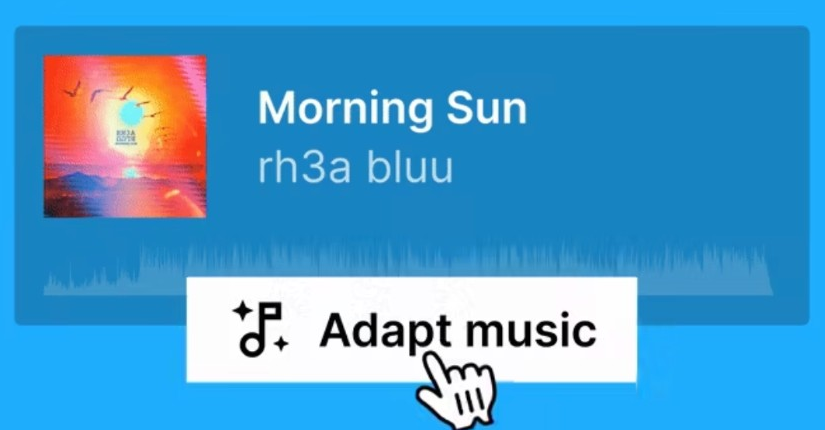
Offer Adapt as an action on a track the user has found or previewed, rather than as a separate place in your product, and keep the original easy to compare against.
A simple experience: ready-made styles

A row of styles in a mobile video editor. Each style is a remix with a prompt written in advance.
For users who aren't experienced with music, offer a few styles such as "Warmer", "Dreamy" or "Epic". Each style is a remix with a prompt you have written and no remix.stems, so the Epidemic Sound API picks the stems that fit the prompt. The user only taps a style: there is no prompt to write and no stem to choose.
A one-tap instrumental mix fits here too. It is a compose of the track's original stems without VOCALS.
An advanced experience: full control
For users who know what they want to change, Adapt works in three steps. The screenshots are an example from our webpage, showing one way to build each step.
Step 1 — Describe the change. The user writes a prompt and, if they want, picks the stems to change. You call POST /v1/adaptations/jobs with a remix.
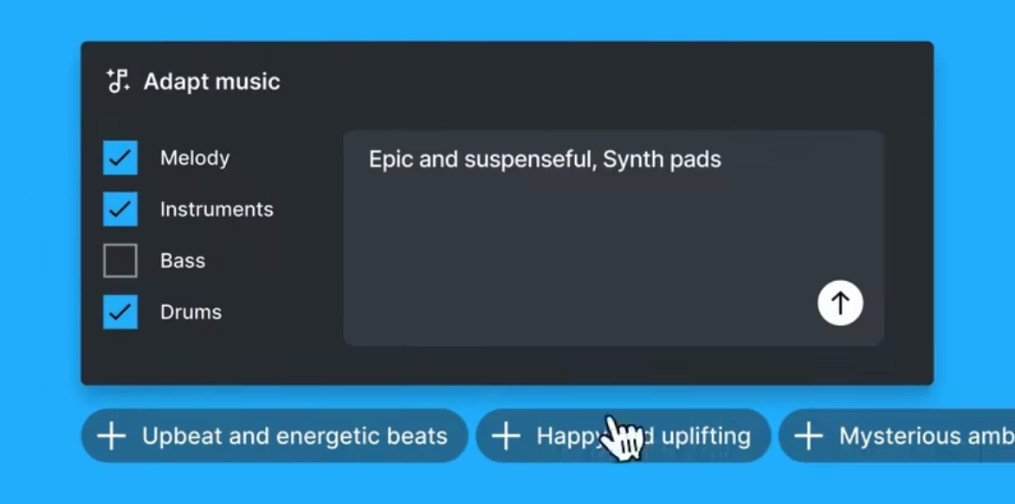
Each control in the example maps to part of a remix request:
| In the example | In the request |
|---|---|
| The prompt box | remix.prompt |
| A suggestion, such as "Upbeat and energetic beats" | Words you add to remix.prompt |
| The ticked stems, here melody, instruments and drums | remix.stems |
| No stems ticked | No remix.stems, so the Epidemic Sound API picks the stems |
Step 2 — Choose the stems and set the volume. For each stem, the user picks where to take it from (the original track or one of their earlier adaptations) and how loud it is, or mutes it. You call POST /v1/adaptations/jobs with a compose.
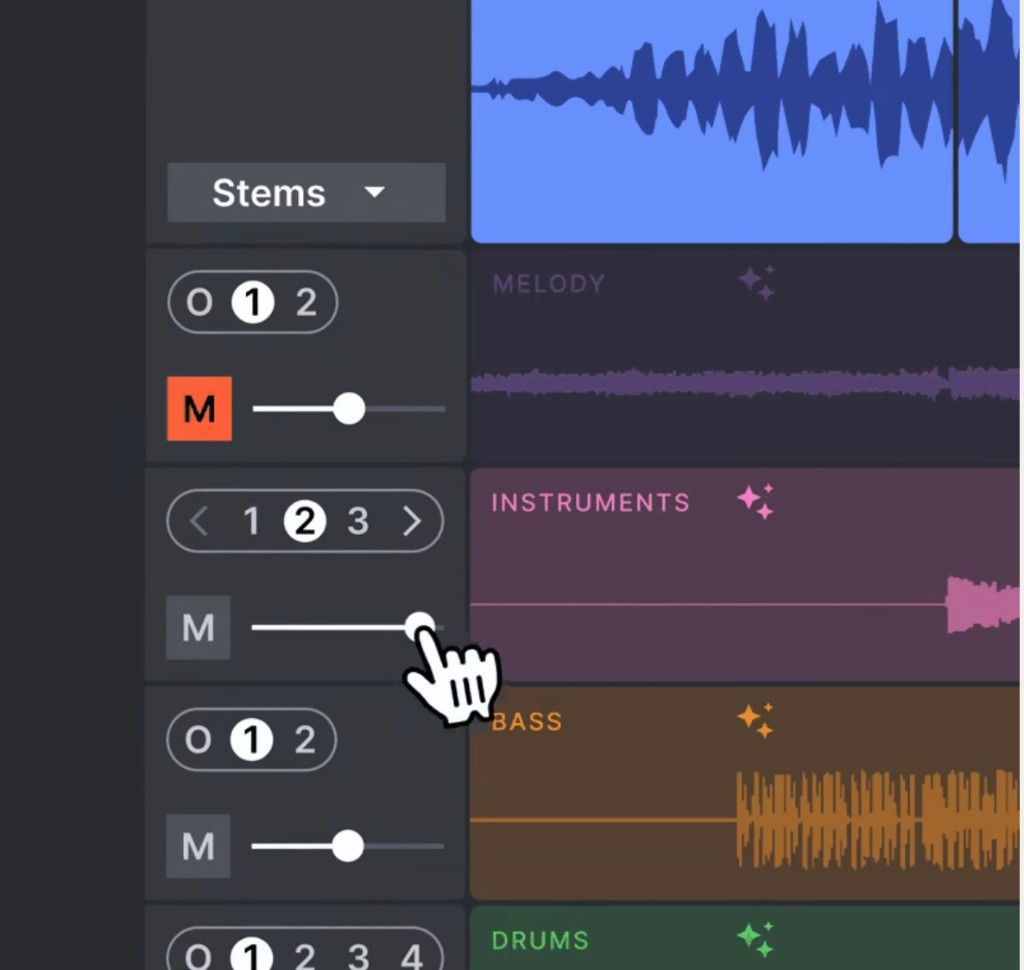
Each stem lane maps to one entry in compose.stems:
| In the example | In the request |
|---|---|
| The version picker: O is the original stem, and 1, 2 and so on are the user's earlier adaptations | No sourceAdaptationId for the original, or the adaptation's id |
| The volume slider | volume, from 0 to 1 |
| M (mute) | Leave the stem out, or set volume to 0 |
In the example, a stem the user doesn't touch stays in the mix. In a compose, a stem you don't list is left out, so list every stem that should be in the result, including the ones the user didn't change.
Step 3 — Work in sessions. In the example, a session holds everything a user has made from one track: the original and each of their adaptations, listed as numbered versions. The user can go back to any of them, listen, and take stems from it in a later compose.
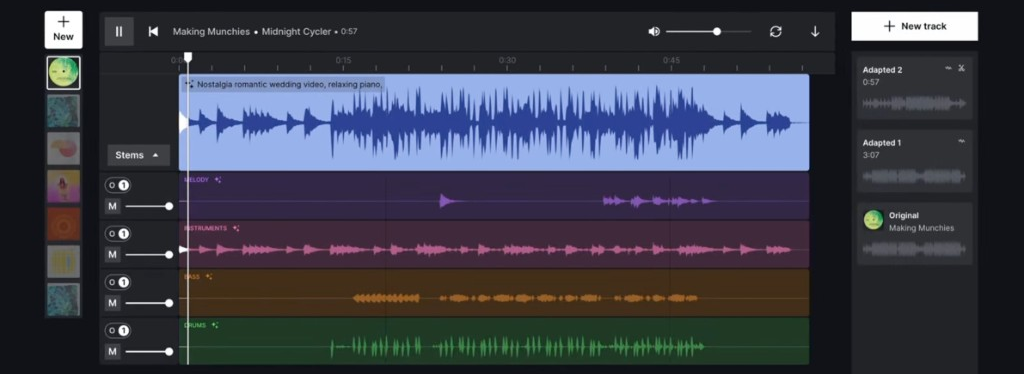
An example Adapt session: the current mix, a lane for each stem, and the original and two adaptations on the right.
The API has no sessions, and no endpoint that lists a user's adaptations. To offer the same thing, store each job id with the user and the track it belongs to (see Poll the job). To let the user play each stem in your mixer, use the stem previews in the result.
Design tips
- Make prompts easy to write. Specific, descriptive prompts work best. Show example prompts, or suggestions that add words to the prompt, as in the example above.
- Design for the wait. Show progress as soon as the user submits. Disable the submit button until the create call returns, and send one
Idempotency-Keyper user action, so a double click or a retry returns the same adaptation instead of spending credits twice. - Make failure easy to recover from. A job fails either for a technical reason, such as a timeout, or because the Epidemic Sound API can't carry out that request on that track.
retriabletells you which. When it istrue, offer to try again, and let the user decide rather than retrying automatically. When it isfalse, the same request fails again, so suggest changing the prompt or the stems, or choosing another track. In both cases, keep the message short and general. - Handle tracks that cannot be adapted. Hide or disable Adapt on tracks with an empty
availableStems. When a create call answersmusic-track-not-adaptable, say the track is not available for adaptation and offer similar tracks instead.
Errors
There are two distinct error shapes.
Job errors — async failures
When a job fails, status is FAILED and the response includes an error object.
{
  "status": "FAILED",
  "error": {
    "code": "TIMEOUT",
    "retriable": true
  }
}
| Field | Description |
|---|---|
code | Open string (not an enum). Branch on retriable for codes you do not recognise. |
retriable | true if creating the same adaptation job again, with a new Idempotency-Key, is worth trying. false means it fails the same way until the request changes. |
There is no message field, and a failed job doesn't say why it failed in words you can show a user. Keep the message to the user general, and use retriable to decide between offering "try again" and suggesting a change to the prompt, the stems or the track.
| Code | Retriable | Meaning |
|---|---|---|
UNSUPPORTED | false | The Epidemic Sound API cannot carry out this request on this track. |
TIMEOUT | true | The run did not finish within its deadline. |
RATE_LIMITED | true | No processing capacity was available in time. |
INTERNAL_ERROR | true | Anything else. |
A failed job is refunded: your app gets its credits back, so a new attempt costs nothing extra if it fails again.
HTTP errors — synchronous failures
Failures of the API calls themselves return an application/problem+json body (RFC 9457). This shape differs from the one described in Error handling, which covers the v0 endpoints.
{
  "type": "/problems/invalid-data",
  "title": "The request is not valid.",
  "errors": [
    {
      "pointer": "remix",
      "detail": "invalid: prompt (string: len 2001 greater than maximum 2000)"
    }
  ]
}
| Field | Description |
|---|---|
type | Identifies the condition. Branch on this to handle a specific case; treat unknown values as generic errors. |
title | Human-readable summary for debugging. Build user-facing messages from the status and type. |
errors | Present on most 400 validation failures. pointer names the field at fault. |
| Status | type | When |
|---|---|---|
400 | /problems/invalid-data | The body or a parameter is not valid, a stem type is repeated, or remix.stems includes VOCALS. |
400 | /problems/adaptations/music-track-not-adaptable | The track cannot be adapted: it has no stems, or its artist has opted out of generative AI. This doesn't change on a retry, and no credits are spent. |
402 | /problems/credits/insufficient-credits | Your app cannot cover the adaptation, or has no access to credits. Nothing was created. |
404 | /problems/not-found | The job or adaptation does not exist or belongs to a different app, or sourceMusicTrackId or a sourceAdaptationId names nothing your app can use. |
409 | /problems/idempotency/request-in-progress | A create call with the same Idempotency-Key is still in progress. Nothing was created. See Idempotency. |
A missing or invalid API key is rejected before the request reaches the API. That 401 response does not carry a problem document, so branch on the status code.
Every response from the API includes an X-Correlation-Id header. Include it when you contact Epidemic Sound about a failed request.
Idempotency
The create endpoint accepts an optional Idempotency-Key header. A repeat call carrying a key already used in your app returns the job the first call created, instead of creating a second adaptation and spending credits again. Send one with every create call, so you can safely retry a call whose answer you never saw, for example after a network timeout.
curl -X POST 'https://api.epidemicsound.com/v1/adaptations/jobs' \
  -H 'Authorization: Bearer your-api-key' \
  -H 'x-partner-user-id: user-abc-123' \
  -H 'Idempotency-Key: 4f6d1b6e-2c8f-4a9a-9f3a-2b6f1c0d5e21' \
  -H 'Content-Type: application/json' \
  -d '{ ... }'
The key identifies the request on its own: the body is not compared. Use a new key for each new adaptation, including a new attempt after a job failed, since repeating the key of a failed job returns that failed job. Keys are 1–255 characters, chosen by you and opaque to the API.
A repeat that arrives while the first call is still being processed is answered 409 with type /problems/idempotency/request-in-progress, and creates nothing. Repeat it with the same key after a few seconds. If the 409 persists, the first call created no job, so retry with a new key.
A create call answered 402 creates nothing, so you can use its key again once your app has credits.
Polling and download calls create nothing, so retry them freely.
Credits
Each adaptation costs 1,000 credits from your app's balance, for a remix or a compose. See Credits for how the balance works and what other actions cost.
The credits are taken when the job is created. Creating a job returns 402 with type /problems/credits/insufficient-credits when your app cannot cover it, and nothing is created.
- A job that ends
FAILEDis refunded: your app gets its credits back. - A create call answered
400, includingmusic-track-not-adaptable, spends no credits.
To see how many credits your app has used, sign in to the Developer Portal and open Overview. The Your credit pool card shows the credits used for each action, adaptations included.
Troubleshooting
Rate limits
Rate limits apply per app and are shared by all its API keys and end users. There are two windows: a daily quota that resets at midnight UTC, and a per-second burst limit. The values depend on your plan, and every response reports both:
RateLimit-Policy: "burst";q=521;w=1, "daily";q=9000000;w=86400
RateLimit: "burst";r=520;t=1, "daily";r=8999971;t=52183
q is the quota, w the window in seconds, r the requests remaining in the window, and t the seconds until it resets. A request over either limit returns 429 with a Retry-After header giving the seconds to wait.
Transient errors
502, 503 and 504 are transient. Retry polling and download calls with exponential backoff, and when the response carries Retry-After, wait that many seconds instead. Retry the create call with the same Idempotency-Key so the retry returns the original job rather than creating a second one. See Idempotency.